Guide
How to make Reddit story videos for TikTok
Turn a story into a vertical video with narration, gameplay and timed captions. This walkthrough follows the current StoryTok editor, from the script to a downloadable MP4 and optional publishing.
Open the story editor3 free trial minutes. No card. Trial videos are watermarked.
Step 1
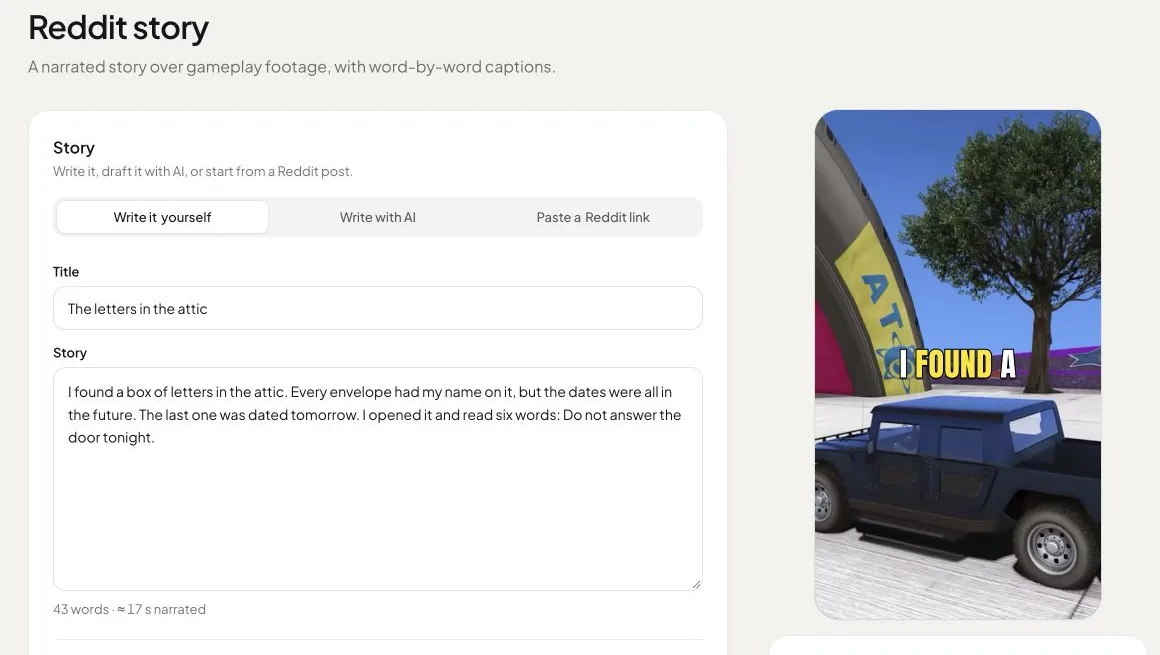
Pick a story
Open Reddit story. Choose Write it yourself, Write with AI, or Paste a Reddit link. Public, accessible text posts can be imported; deleted, private or unsupported posts cannot. Check the imported text and use a story you have permission to adapt. Start with a short script and check the estimate before rendering.
Step 2
Choose voice, background, and captions
In Look & sound, open Voice, Footage or Captions to change a setting. The preview stays beside your script on desktop; on a phone, open the preview from the bottom bar. Included voices use 1 credit per minute; premium voices use 2. Your own footage can be uploaded to the background library.
Step 3
Add the Reddit intro card
An optional title card shows the post like a real Reddit screenshot (username, upvotes, comments) before the narration starts. Review its title and author before rendering.
Step 4
Render
One click renders a 1080×1920 MP4 with narration and synced captions and saves it in Videos. Render time varies with length and settings. When it is Ready, open the video to play or download it.
Step 5
Connect an account and publish
To post from StoryTok, connect TikTok, Instagram or YouTube in Publishing → Accounts (Instagram needs a professional account). Open the finished video, choose Publish, tick the accounts and write a caption; YouTube also takes a title. Trial videos are watermarked and cannot be published, so this step needs a video rendered on paid credits.
Step 6
Review, schedule and check the result
Post now or pick a date and time, then review the cost (1 paid credit per video per account) and confirm that the post goes out publicly. The Publishing page shows each account's status and links to the post once the platform confirms it. A failed post returns its credit.
What it costs
- 3 free trial minutes at signup, no card, for rendering. Trial renders carry a small watermark and cannot be published.
- After that, one-time credit packs: $5 for 20 credits, $10 for 60, $50 for 360. Rendering is 1 credit per minute (2 with a premium voice). No subscription, and credits never expire.
- Publishing from StoryTok is 1 paid credit per video per account: a 2-minute story is 2 credits to make, 3 posted to one account, 5 posted to three. Downloading is free.
- Posting daily? Autopilot sources the day's top post from your subreddits, rewrites it into an original script, renders it on a schedule and can post it for you.
Want the whole loop hands-off? Read how to automatically post Reddit story videos, or see how publishing works.
Comparing tools? See how StoryTok stacks up against Crayo and AutoShorts.
Questions
Can I make Reddit story videos for free?
Yes. StoryTok gives every new account 3 free render minutes with no card required, enough for one to three short story videos. Trial videos carry a watermark and cannot be published from StoryTok. After the trial, rendering costs 1 credit per minute (about 17 cents on the $10 pack) with no subscription.
How long does it take to make a Reddit story video?
About two minutes of render time per video. You paste a Reddit URL or story text, pick a voice, background, and caption style, and StoryTok handles narration, caption timing, and export automatically.
Can StoryTok post the video for me?
Yes, from the web app, to your own TikTok, Instagram and YouTube accounts, now or on a schedule. It costs 1 paid credit per video for each account, on top of the render. Every post is public, Instagram needs a professional account, and YouTube decides whether an upload counts as a Short.
See a finished render
Turn a story into a video
3 free minutes to try it. No card, no plan, nothing renews.
Try StoryTok free