Guide
How to make AI story videos
Pick a niche or paste a story, choose one of six looks, render, then download or post. StoryTok narrates the story, draws an AI still for each scene with a slow zoom or pan, and captions it in 9:16 for TikTok, Reels and Shorts. A story of up to a minute costs 2 credits with an included voice, about 33¢ at the $10 pack rate. The screenshots and the two videos below come from a real account on November 23, 2026.
Open the AI story editor3 free trial minutes, including one AI story. No card. Trial videos are watermarked.
Step 1
Open the AI story editor and pick a niche
From New video, choose AI story. Under Write with AI, pick one of six niches: Scary stories, History, What if?, Motivation, Myths & legends or Bedtime stories. Each niche has its own writing brief and starting look. Type a topic, or leave it blank and the AI picks one.
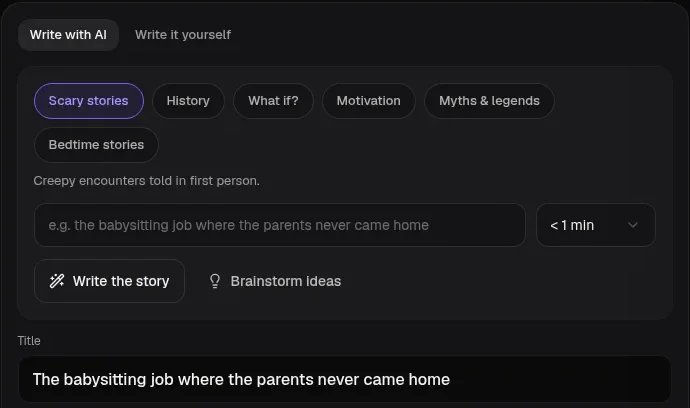
The editor opens on a short sample story for the selected niche. Screenshot from November 23, 2026. Step 2
Write the story, or paste your own
Choose a length (under a minute is 110 to 140 words, about 2 minutes is 220 to 300, about 3 minutes is 380 to 480) and press Write the story. Edit the draft freely: every sentence becomes part of a scene. To use your own script, switch to Write it yourself and paste up to 12,000 characters.
Step 3
Pick a look
Choose one of six looks for the whole video: Clean cartoon, Creepy cartoon, Stickman, Anime, Cinematic or Comic book. The preview shows the same sample scene in each. Below it, pick a voice, a caption style and optional music.
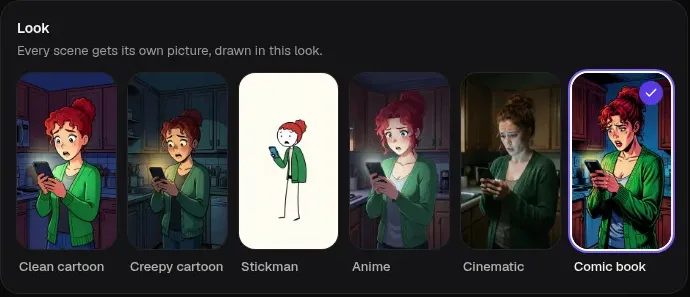
Comic book selected for the What if story rendered below. Screenshot from November 23, 2026. Step 4
Check the cost and render
The cost card shows the credits before you render: 2 credits a minute with an included voice, 3 with a premium one. Render, and StoryTok splits the narration into scenes, draws one picture per scene, adds a slow zoom or pan and captions, and saves a 1080×1920 MP4 to Videos.
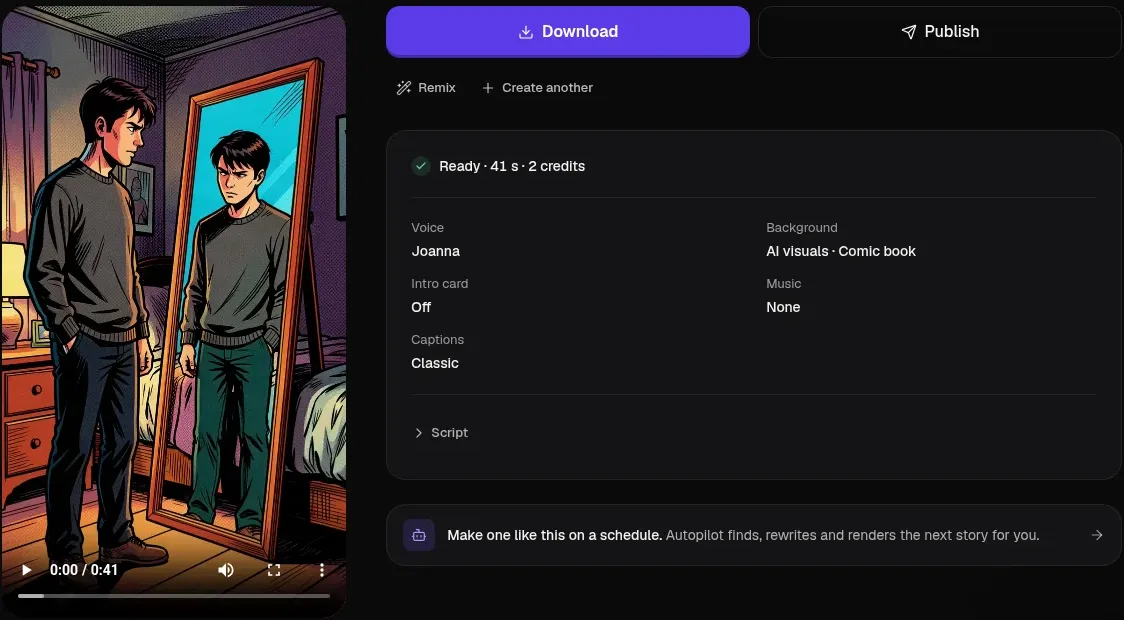
The finished What if story: 41 seconds, 2 credits. Screenshot from November 23, 2026. Step 5
Download or publish
Download the MP4, or press Publish to post or schedule it to connected TikTok, Instagram and YouTube accounts for 1 paid credit per account. StoryTok turns on TikTok's AI-generated label and YouTube's altered or synthetic content setting for every AI story it posts. Trial videos are watermarked and cannot be posted.
The two videos, and what they cost
Both were made in a real account on storytok.ai and are shown exactly as they rendered. The first was written with AI in the What if? niche. The second was written and rendered by an Autopilot series in the Scary stories niche, with nobody touching the script.
- The What if story: 41 seconds, Comic book look, included voice. Charged 2 credits, about 33¢ at the $10 pack rate.
- The scary story: 44 seconds, Creepy cartoon look, written and rendered by an Autopilot series. Charged 2 credits.
- The same one-minute story with a premium ElevenLabs voice would be 3 credits, about 50¢.
- Over a minute, billing rounds up with 5 seconds of grace at each minute: a 1:30 AI story is 4 credits with an included voice.
- A daily 45-second series with an included voice, posted to one account: about 90 credits a month, about $15, on paid credits.
Labels and YouTube's monetization policy
TikTok and YouTube both ask creators to disclose AI-made content. When StoryTok posts an AI story, it sets TikTok's AI-generated label and YouTube's altered or synthetic content setting for you. Instagram has no equivalent setting in StoryTok's publishing, and a video you download and upload yourself carries no label until you add one.
Labels are not the bigger risk. YouTube's channel monetization policies, updated on July 15, 2025, say content must not be “mass-produced, generic, repetitive, or manipulative”, and count content that looks made from a template as repetitive. An AI story is a narrated slideshow, so make each video different and read the script before it posts. Review before posting in Autopilot holds each video for that.
Running a daily series
In Autopilot, create a series and choose AI stories as the source instead of subreddits. Pick the niche, an optional topic, a length (45 seconds, 90 seconds or 2.5 minutes), how often (twice a day, daily, every other day or weekly), a look and a voice. The form shows the first week of videos and what they will cost before anything renders.
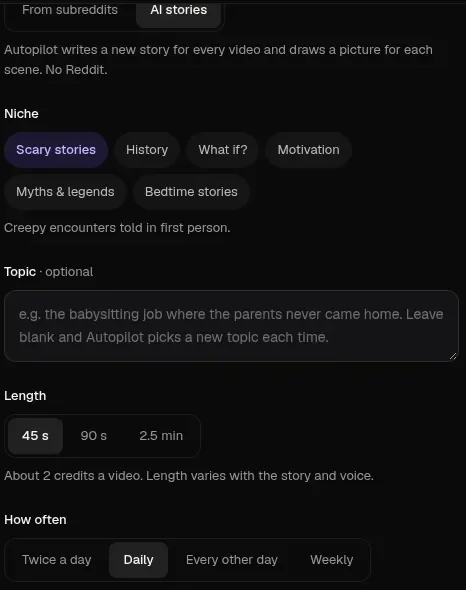
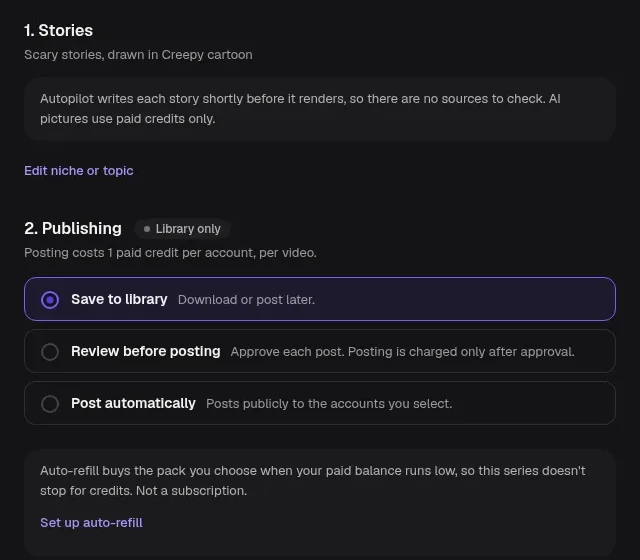
- Start with Save to library or Review before posting. Post automatically sends each video publicly to the accounts you choose, within a spending limit.
- Autopilot writes each story shortly before it renders and is given the series' earlier titles, so it does not repeat a story.
- Series drawn with AI pictures need paid credits and will not start on the free trial.
- The caption and YouTube title are set once for the series and reused on every video.
For niche advice, see the scary story and what if pages, or the AI story video generator for all six looks and niches. Comparing tools? Read the best AI story video generators.
Questions
How much does it cost to make an AI story video?
An AI story costs 2 credits per finished minute with an included voice and 3 with a premium voice. Our What if example ran 41 seconds and cost 2 credits, about 33¢ at the $10 pack rate. Posting from StoryTok adds 1 paid credit per account.
Can I make an AI story video for free?
Yes, one. Every new account gets 3 free minutes with no card, and one of the trial videos can be an AI story, enough for a story of about a minute. It carries a watermark and cannot be posted from StoryTok.
Does StoryTok label AI stories when it posts them?
Yes. When an AI story is published from StoryTok, TikTok's AI-generated label and YouTube's altered or synthetic content setting are turned on for that post. If you download the video and upload it yourself, set those labels in the platform's upload screen.
Can an AI story channel be monetized on YouTube?
YouTube decides under its channel monetization policies. An update on July 15, 2025 made clear that repetitive or mass-produced content is not eligible, and that content which looks made from a template counts as repetitive. Original stories that differ from video to video are the safer bet. StoryTok cannot promise monetization.
How do I make a new AI story every day?
Start an Autopilot series with AI stories as the source: pick a niche, a look, a voice, a length and a schedule. It writes and renders a new story each time and can save it, wait for your approval, or post it. Series drawn with AI pictures run on paid credits only.
Is this AI video?
No. Each scene is an AI-drawn still picture with a slow zoom or pan. There are no generated video clips, avatars or lip sync.
Make your first AI story
3 free minutes, including one AI story. No card, no plan.
Try StoryTok freeUpdated November 24, 2026