How to make a texting story video
A fictional chat, revealed one message at a time. Here is the complete workflow in StoryTok, with a real rendered example and a script you can adapt.
Make a texting video3 free trial minutes. No card. Trial videos are watermarked.
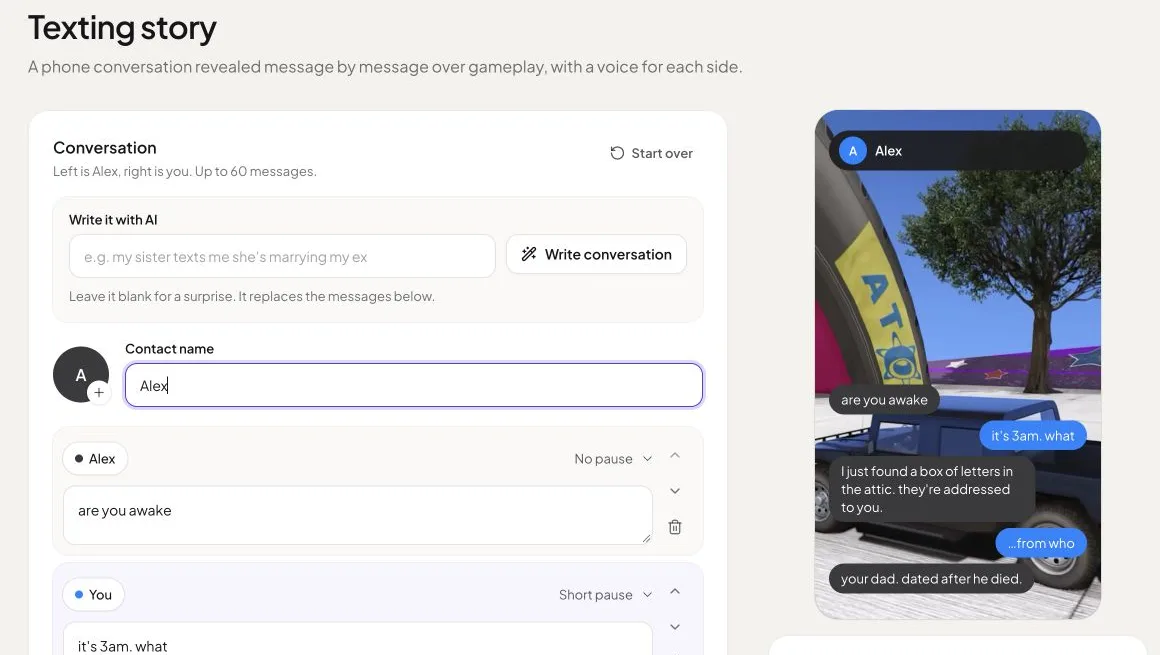
1. Write the conversation
Open Texting story and set the contact name. Use the sender button on each message to switch sides. Add messages with the contact or You buttons. Alternatively, enter a premise in Write it with AI, then edit the draft. AI generation replaces the messages already in the editor.
2. Set the reveal timing
Each message has a pause selector: no pause, short, long or dramatic. Put a pause before the reveal, then use the preview to check the order. Keep each message short enough to read comfortably. The editor accepts up to 60 messages, with 240 characters per message.
3. Choose the look and voices
Open Chat theme under Look & sound. Choose iMessage light or dark, WhatsApp, Android, Instagram DM or Snapchat. Pick a voice for each side, select gameplay or your own footage, and choose whether message sounds play. Narration can be switched off.
4. Check the estimate and render
Review the credit estimate beside the preview, or in the bottom bar on a phone. Choose Render video. The finished length determines the final charge: 1 credit per minute with included voices, with 5 seconds of grace at each minute boundary; premium narration uses 2× credits.
5. Download or publish
Open the Ready video in Videos to play or download the MP4. For a video rendered with paid credits, connect accounts under Publishing → Accounts, then choose Publish from the video. Posting costs 1 paid credit per video per account. You can post now or schedule a time.
An example you can adapt
This fictional suspense conversation was rendered with included Polly voices. The finished video is 43.53 seconds and used 1 render credit. Publishing it to one connected account would add 1 paid credit.
Alex: Are you awake?
You: It’s 3am. What?
Alex: I just found a box of letters in the attic. They’re addressed to you.
You: From who?
Alex: Your dad. Dated after he died.
The video continues the story. Use an invented contact and conversation; this is a storytelling format, not evidence of a real exchange.
Questions
Can I try a texting video for free?
New accounts receive 3 free trial minutes, with no card required. Trial renders are watermarked and cannot be published through StoryTok. Paid credits apply to new renders; buying a pack does not remove a watermark from an existing video.
Can I automate a texting series?
Texting stories are made one at a time. You can schedule a completed paid render for publishing, but Autopilot currently creates Reddit stories only.
Does the conversation need narration?
No. Switch Narration off in Look & sound for a silent reading format. With narration on, choose a voice for each side; premium voices cost twice the included-voice rate.
Write your first texting story
3 free trial minutes of rendering at signup. No card, no plan, nothing renews.
Try StoryTok freeSee all texting video features, or follow the Reddit story walkthrough.